Author: Mark Liskey

  • Will a Low Massage Table Hurt Your Back?

    Will a Low Massage Table Hurt Your Back?

    Will working on a low massage table hurt your back?

    Not if you adopt these strategies:

    (1) use the table for support,

    (2) take wider stances when doing lighter pressure,

    (3) incorporate seated work and

    (4) avoid static posture positions.

    When you do those four things you’ll be able to deliver all ranges of pressure efficiently and with minimal strain on your body.

    I know, I sound pretty confident with that answer.

    Here’s why: For about 20 or so years my massage table height was normal.

    Hold on there, Mark, what’s normal?

    Good question.

    Normal to me was setting my table height so that the first knuckle of my middle finger would touch the top of the table.

    Edward Mohr recommends figuring out your table height by first trying your table at half your height.

    Bottom line, there is no consensus on what normal should be, but we can say this about normal: It has recognizable boundaries.

    In other words, we all recognize when a massage table height is out of the normal range.

    All least my clients do: “Hey, Mark, is your table too low? Isn’t that gonna hurt your back?”

    So, for about 20 years I set my massage table height within the normal range and clients weren’t worried about my back.

    Then about 5 years ago all hell break loose. I was diagnosed with cervical radiculopathy, cubital tunnel syndrome and shoulder instability.

    The way I was doing massage was killing my body, and I needed to find another way to get the job done.

    Here’s the short version of what happened next. Because my neck and shoulder hurt when I did deep work with my forearm, I needed to find an alternative to my forearm.

    Enter fists.

    Massaging with Fists

    But there was a problem with fists at the normal table height. I couldn’t transfer my body weight onto the client. So, I’d have to use a whole lot of pressing action with my upper-body to generate deeper pressure which meant more stress in my neck and shoulder.

    So, I lowered the table so that I could lean (transfer) my body weight through my fists onto the client.

    Bingo!

    Deep pressure was easy do when I did that.

    But no one is just going to use fists throughout an entire massage, right? And when fingers and palms and forearms start to come out, the table is going to be too low. One case of back strain coming up!

    That’s 100% true UNTIL you learn how to adapt to a low massage table.

    My adaptation process was accelerated last year when I decided to do a Can My Massage Table Be Too Low? experiment. For 7 days, I set my table on the lowest setting possible for each client I saw, no matter if they were big or small, thick or thin.

    Guess what happened to my body?

    Nothing.

    Now I’ve taken it even a step further and two months ago I set my massage table at the lowest setting possible for each and every massage.

    I don’t plan on ever changing that.

    Why Stay Low?

    I’m sticking with low for two reasons. One, I can generate pressure effortlessly by simply transferring my body weight onto the client.

    And, two, I know how to adapt to a low table so that my back is fine.

    Here’s a quick primer on how to lean when using a low massage table.

    [embedyt] https://www.youtube.com/watch?v=NhBh2cdGz6A[/embedyt]

    And here’s how you adapt to a low massage table.

    Low Massage Table Hurt Your Back NOT – Adaptations

    A low table looks scary, like it’s going to hurt your back–but it won’t.

    The Can My Massage Table Be Too Low? experiment put a spotlight on 4 things that had to be done in order to successfully adapt (no strain in your back) to a lower table.

    Let’s tackle these four things right now.

    1. Bend your legs.

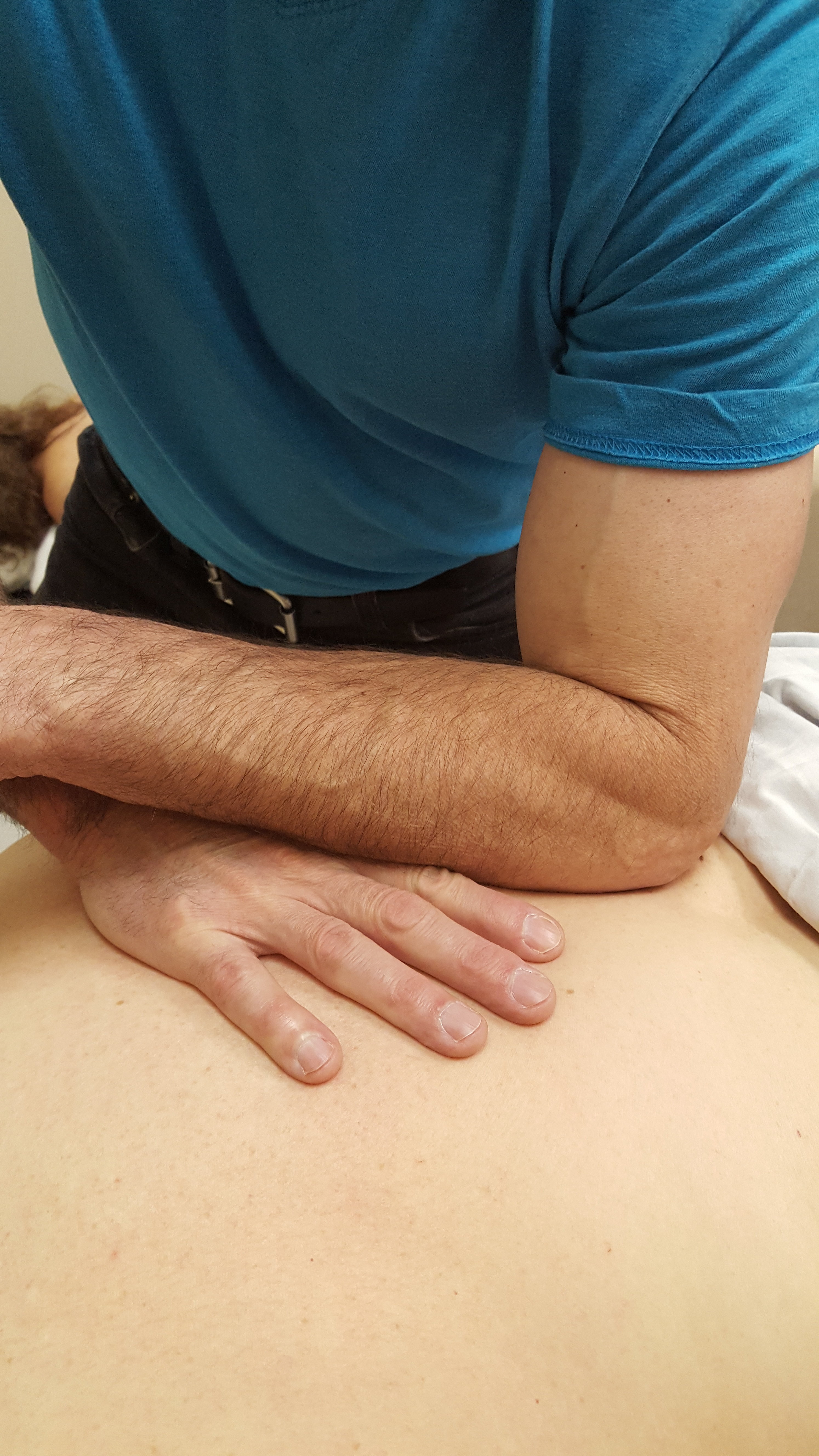
    Here I’m delivering deep pressure with my knuckles and fists. The table is low so that I can lean into client.

    But when I want to lighten the pressure it gets more complicated. I can either bend at the back and cripple myself OR bend my legs like I’m the Karate Kid.

    It will feel a little weird at first when you start doing Karate Kid stances, but you’ll love the results. No back pain.

    During the experiment I took bending my legs to whole new level. But I didn’t fatigue because of thing number #2.

    2. Use the table for support.

    Think of the table as a wall to lean against. Use it to support your weight.

    Look at my back leg in this pic. A lot of my weight is being directed into the table through my leg.

    Here I’m leaning into the table in a Karate Kid stance. (Notice how I can really get into the lamina groove on this person….haha…)

    Once you get that “the table can help hold you up”, you start looking for ways to rest against the table. And you begin to…

    3. Approach massage as dynamic work, not static work.

    By dynamic I mean moving and flowing with a purpose in mind–to effortlessly do a good massage.

    Here’s a movement sequence that happens naturally when you bend your legs and use the table as support.

    Deep pressure first.

    Relax your back.

    Then I bend my legs for light pressure on the neck.

    In this light pressure situation I switch to one hand and get vertical. Notice my leg against the table. I’m still using the table as support.

    And at the end I throw in a stretch.

    It may look like a lot of work, but if you’re at one with your massage table (using the table to support some of your weight), massage becomes effortless.

    4. Sit when you can.

    I have to come clean. The reason I perfected seated massage was because my toe hurt at the end of long work days and I was tired of adjusting the massage table for each client.

    So, one day I kept my table height on the lowest setting for everyone. And when a light pressure client came in guess what I did?

    You got it. I sat down for a lot of the massage.

    It worked great. (And later with other clients I discovered how to generate deeper pressure when sitting, especially in areas like the traps.)

    Want to know more about sitting on your butt to do massage? Check out How to Use a Massage Stool.

    A Low Massage Table Won’t Hurt Your Back in a Nutshell

    After you use the strategies that I’ve talked about for working on a low table the question actually changes to: Can your massage table be too high?

    And my answer is yes.

    If your massage table is too high for you to lean to generate pressure then you’re going to have to press really hard with your upper-body.

    You may be able to get the job done, but at what cost?

    Your hands, arms, shoulders and neck will let you know.

    Whereas, if you have a low massage table, medium and deep pressure is a slam dunk.

    And during times when a low table is not optimal for your back (like thin people and light pressure), you can easily adapt to a low table by bending your legs, using the massage table for support, breaking up static posture positions and sitting to do massage when you can.

    This video brings it all together:

    Read my articles and watched my videos, but deep pressure still kicks your butt?

    I can help.

    From 1,000 miles away?

    Actually, yes. Click here.

  • HostGator, Wix, Weebly: 3 Websites Built & Compared

    Is HostGator better than Wix and Weebly?

    The short answer is…

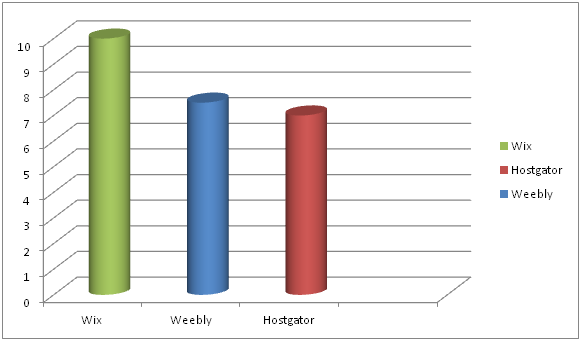
    (1) HostGator is the least expensive for the first two years,

    (2) Weebly is the easiest to use (unless you know certain things about Wix which I explain later in this article, and then Wix is the easiest to use) and

    (3) Wix has the best designs.

    So which one is better?

    At first glance, the answer seems pretty obvious, right?

    It’s whichever category—price, ease to use or appearance—is the most important to you.

    But what if two categories (or all three categories) are equally important?

    That’s what happened to me, and here’s what I did to figure it out.  

    But first there’s something you need to know: I’m website challenged.

    I struggle with design.

    I’m not techie.

    And I get hung up on small details that stop me dead in my tracks BUT (and it’s a big “but”), I don’t want to pay a website designer to build a website for me. For better or for worse, I’m stuck with me.

    The HostGator, Wix, Weebly Experiment

    So, to figure out which website builder worked best for me I ran an experiment where I built the same website (content, theme picture, pages, including a blog) on three different website builders (HostGator, Wix, Weebly).

    This is how I compared them: 1. ease to build 2. price, and 3. appearance.

    HostGator, Wix and Weebly are all drag and drop website builders.  And, believe me, that’s what you want if you’ve never built a website before.

    You already know the ending of the story. I found that…

    Weebly is super easy to use.

    HostGator is the cheapest for the first two years.

    Wix has the best designs.

    But there’s more to this story than meets the eye.

    Once you see the websites that I created and start to think about building your own website, your opinion about which category is the most important for you might just change.

    It did for me.

    By the way, if you’re really want your blog to be the central feature of your website (at least one blog post per week), read this first.

    Before we get started with the comparison, I want to be crystal clear and tell you that the Hostgator, Weebly and Wix links below are affiliate links.

    That means if you purchase through one of them I get a commission. But you don’t pay more for purchasing through a link.

    I also want to mention that I chose these 3 website builders to compare because I have researched and built websites on all three platforms. And I only recommend products/services that I think are helpful.

    If you do sign up through a link, thank you for supporting my work.

    And if you ever have a question/issue regarding Hostgator, Wix or Weebly, come to me, let me know below and I’ll make sure that you have an answer/solution.

    This is my email address: mark@makethemostofmassage.com

    Sound good?

    Okay, let’s get down to business.

    1. Ease to Build

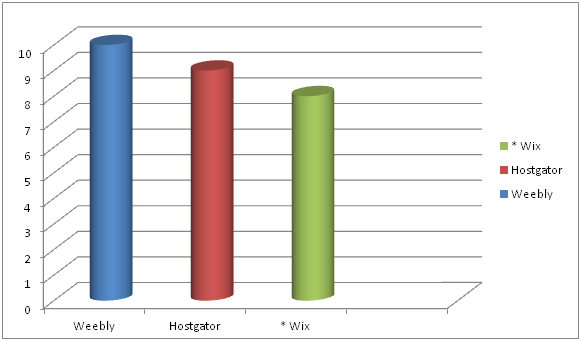
    Here are my EASE TO BUILD rankings:

    First you need to know that all three website builders–Weebly, HostGator, Wix–are solid website builders and doable for the novice website builder.

    Wix can be the most difficult because it has many more design options for the users than Weebly and HostGator.

    But note that there is an asterisk next to Wix.

    Why?

    Because Wix has a design feature that makes things way easy.

    Combine that with some key hints about navigating the Wix dashboard and Wix was easier for me than Weebly. More about that later.

    HostGator is very straight forward and easy to use, but with a couple of things not quite as easy to use as Weebly.

    Mobile View

    For instance, when you’re building your website you’ll be building a desktop version and a mobile version.

    So, basically what is built on the desktop needs to get smooshed into the the mobile version.

    Well, not exactly smooshed.

    But it’s not going to look the same as your desktop view because it’s going to have fit on a much smaller screen.

    With HostGator and Wix you always need to check what your mobile view looks like because their smooshing doesn’t always look right.

    With Weebly, you don’t have to monkey with your mobile version. In fact, you can’t.

    Weebly’s smooshing is supposed to represent the best version you could possibly have within their framework.

    That’s super easy for the person building the website, but it’s also the most limiting of the three in terms of being able to control your design.

    2. PRICE

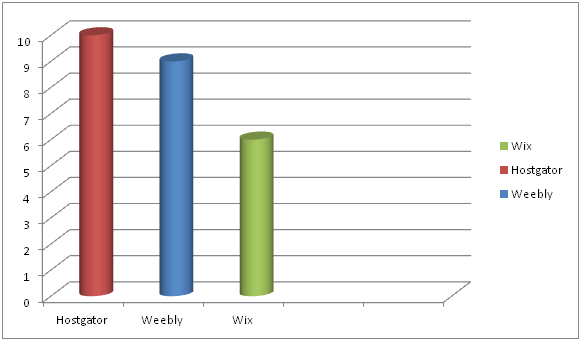
    My ranking order for PRICE goes:

    HostGator nudges out Weebly in terms of best pricing–but only for the first two years.

    Before I get into the details of the whole pricing picture I want to talk about Weebly and Wix’s free website builders.

    They are like writing you contact info on a napkin and calling it a business card.

    Okay, maybe not quite that bad, but unprofessional in my book.

    For one, your domain name will be complicated and look cheap.

    If your business in called Annie’s Massage and you own the domain name www.anniesmassage.com, your free version web address will be something like www.anniesmassage.com/wixfree or www.anniesmassage.com/weeblysite.

    Imagine putting the free version web address on your business card.

    It’s going to look unprofessional.

    And are potential clients going to remember to do the / and type in everything after that?

    The other big issue with the free versions is that your websites will have ads them that you don’t control.

    Hopefully none that advertise for Hand & Stone. Lol.

    Website Builder Essentials

    Here’s what I think is important when purchasing a website builder package:

    No ads if possible.

    Free domain name.

    A basic plan. (You don’t need the PRO, BUSINESS or GALAXY website package deal).

    Ideally, it’s more professional looking to have email with your domain name address, but you don’t need that right away.

    Okay, now to the pricing of the paid plans.

    Website with Domain Name Email Pricing

    To keep things clear, below is the pricing structure if you purchased your website builder/service at the cheapest offering of each provider with domain name email.

    HostGator’s cheapest offering requires a 2-year commitment paid upfront.

    Weebly’s cheapest offering requires a 2-year commitment paid upfront.

    Wix’s cheapest offering is month-to-month.

    HostGator Wix Weebly
    $46.08 ($3.84/month
    for a website)  
    $156 ($13/month for a website)   $48 ($4/month
    for a website)  
    $60 ($5.00/month for email)   $60 ($5.00/month for email)   $60 ($5.00/month for email)  
      $106.08/year     $216.00/year   $108.00/year

    Cheaper Pricing

    If you want to just use your personal email instead of a domain name email, you could knock off $60 across the board.

    HostGator Wix Weebly
    $46.08 ($3.84/month for a website)   $156 ($13/month for a website)   $48 ($4/month for a website)  
    $46.08/year   $156.00/year $48.00/year

    HostGator and Weebly are quite the price deals. But there is more to this pricing.

    After 2 years, the HostGator $3.84 special pricing goes to normal pricing of $7.68/month.

    So, HostGator will save you a few bucks over Weebly the first two years but it will cost your more the subsequent years.

    Long term Weebly is the better price deal, BUT also worth noting is that if you go with the cheapest HostGator plan there will be NO ads on your website.

    The cheapest Weebly plan has Square ads. You have to upgrade to Pro ($12/month) to get rid of the Square ads.

    Years Cheapest Price Advantage Disadvantage
    1 & 2   HostGator HG – $46.08/yr
    W – $48/yr
    No ads on website
    After 2   Weebly W – $48/yr
    HG – $92.16/yr
    Square ad on website

    At this point, if you’re super-economizing, you’re thinking it’s a toss up between HostGator and Weebly.

    But there’s a wild card that we haven’t talked about. And it’s: What is the website going to look like?

    3. APPEARANCE

    Here are what my three websites look like: 3 Website Video

    Which one do you like better?

    If you’re like me, you like the look of the Wix Test Site the best.

    My APPEARANCE ranking goes:

    But wait, is it a fair comparison?

    There seems to be a lot more pictures on the Wix website.

    Well, I started out this experiment by saying that I was going to use one stock image and the same content on each website.

    I built the HostGator and Weebly websites first—and I was, for the most part, able to do that no problem.

    The Wix Experiment

    Then I got to Wix and the experiment started to unravel.

    Why?

    Because Wix’s designs are like a paint-by-numbers picture.

    And you don’t want to leave out a color because you want your painting to look exactly like the picture on the box!

    Seriously.

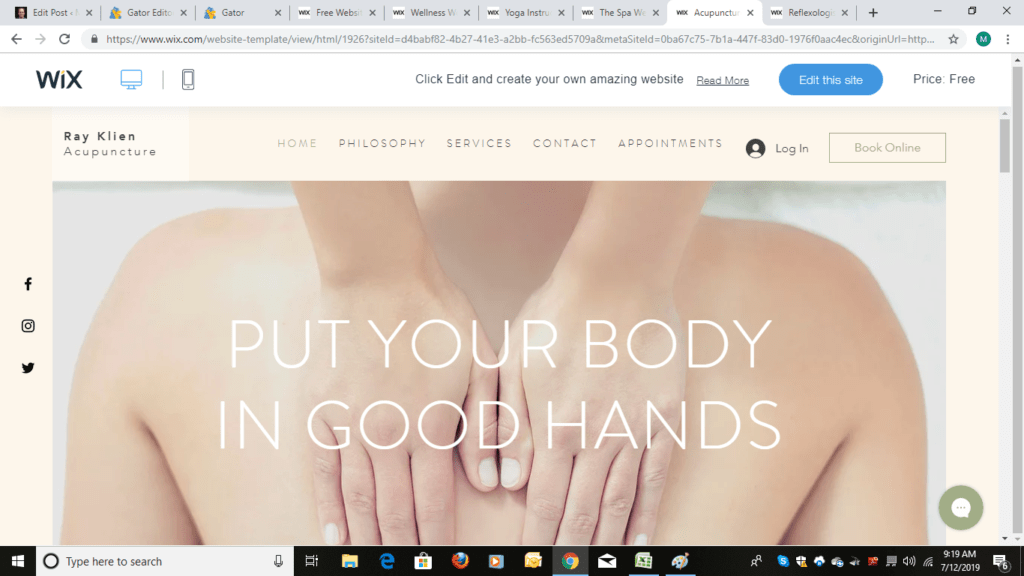
    For starters Wix has templates designed for massage therapists, not just spas.

    That’s huge because then you have to do less editing to make the template work for you.

    But my initial experience using Wix wasn’t all angels singing.

    It was punctuated with moments of me grabbing my face and wanting to pull it off in frustration until I figured out things on the navigation dashboard and started using ADI (Artificial Design Intelligence).

    Then it was smooth sailing.

    So, if you ultimately do go with Wix, I don’t want you pulling your face off.

    I made you a How Not to Pull Your Face Off with Wix Cheat Sheet and I walk you through using ADI at the end of this article.

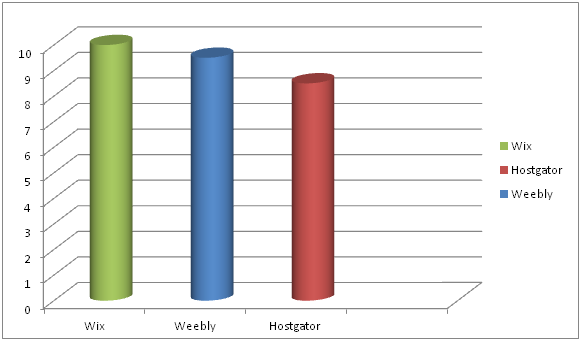
    Once I had my cheat sheet and went the ADI route my EASE TO USE rankings changed to:

    By the way, if you’re good at design, Wix gives the most control of what you can change in the design element.

    So, as you may have guessed by now, the appearance category which was 3rd in my ranking as to what was important initially moved to 1st as I went through the experiment of building a website on Wix.

    But that’s me.

    What about you?

    HostGator

    Go with HostGator if you want a great PRICE with no ads.

    Click on Starter package.

    Then on the next page you fill everything else out including domain name.

    Weebly

    Go with Weebly if you want a great long-term price and you don’t mind having a Square ad on your website. (You can always upgrade to get rid of the ad at anytime.)

    Here’s how to get through checkout on Weebly without getting lost.

    If you select the Connect option you’ll get more pricing options, but first Weebly wants you to sign up.

    Now comes the other pricing options in Connect:

    The 2-year Connect option is $4/ month (the 2 years need to be paid upfront).

    The 1-year Connect is $5/month (the 1 year needs to be paid upfront).

    You can also go month-to-month for $8/month.

    The ProPlan at $12 gets the Square ad off your website.

    Once you select your plan you will be taken to the payment section:

    Fill that out and you’re in. You’ll go to your dashboard and then select a domain name if you don’t already have one.

    Wix

    Go with Wix if APPEARANCE and EASE TO USE (following my tips) are number one on your list.

    And you can totally experience Wix ADI before you even whip out out your credit card.

    Here’s how you do that. Go here and click on Start Now.

    Then click on sign up.

    After you sign up (no money paid) the coolness begins.

    Start answering the questions.

    Keep going.

    Because you will quickly get to a screen…

    …that says this: ADI (Artificial Design Intelligence)!

    It will only take a few more minutes to answer questions like this:

    You can see where this is going.

    And before you know it…

    You are here.

    And BOOM your website design is practically done.

    Changing things like theme colors is simple and ADI offers suggestions.

    You can finish the entire website without paying.

    BUT if you want your domain name attached to the site with no ads and want the ability to sell gift certificates, take credit cards, do online bookings and run a business then go to the upgrade tab and purchase the $13/month plan.

    And if you go with Wix here is your cheat sheet. Below that is help with content on your website.

    How NOT to Pull Your Face Off with Wix

    1. Don’t ever use their internal “search for help”. It will make you bang your head against the wall. Do a Google search instead.

    2. If you want to save time and don’t fancy yourself a designer, try their ADI (Artifical Design Intelligence) option, like I just showed you. That’s what I did and it worked like a charm.

    It will ask you a series of questions and then provide you some template options based on your answers.

    Key words that I went with were “massage therapist” and “minimal”.

    3. Don’t be afraid to delete a section if it doesn’t work for you.

    4. Check mobile view and edit it if you need to.

    One of my issues in the mobile view was wording in on one section of my website was washed out because of the background picture.

    You can go to advanced features and mess with stuff or you can simply click on the section in mobile edit and select a new design for that section.

    Content for your Website

    After you’ve selected a website builder (or if you have one already), go to Step #2 in my How to Build a Massage Website Guide so that you can create your Home, About and Services page.

    Keep the momentum going!

    There’s only one more NOT-big step after Step #2.

    Soon you’ll have a brand, spanking new (and effective) website!

    Remember if you have a website question about Hostgator, Weebly or Wix, I’ve got you’ve covered:-)


  • How to Succeed as a Massage Therapist

    How do you succeed as a massage therapist?

    At the core it’s pretty basic. You…

    (1) do a good massage

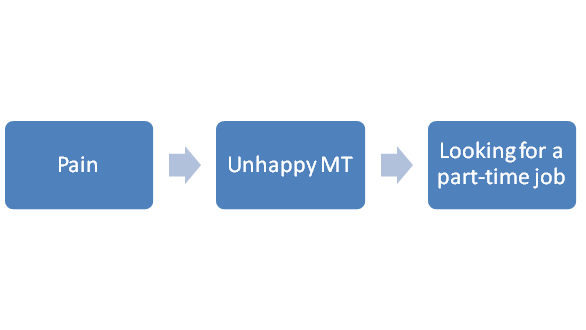
    (2) stay out of pain, and

    (3) get your name out there.

    Do a Good Massage

    Doing a good massage is obvious, right?

    Do meh-massage and you won’t be able to build a business or keep a massage job.

    Number two–stay out of pain–is less obvious.

    Stay Out of Pain

    In fact, it often sneaks up on us, MTs.

    The right thumbs starts to ache a little.

    You ignore it the first week.

    The second week you can’t.

    Week three you get grumpy.

    And by week four you’re wondering if this is your new status quo.

    If pain and doing a good massage don’t trip you up to succeeding as a massage therapist, then getting your name out there probably will.

    Get Your Name Out There

    You know, on second thought, Mark, let’s go back to talking about doing a good massage—

    Wait!

    That’s exactly what I’m talking about.

    When you’re not making enough money to make ends meet, you automatically go back to taking more courses on techniques and modalities, thinking more knowledge and skill will translate into more clients.

    Has it?

    My guess is that the answer is more meh. You got a few more clients, but you probably need a ton more.

    Falling back on honing your craft is safe and easy.

    Getting your name out there makes you pee your pants.

    We’ll take care of you peeing your pants in a minute.

    But let’s not jump the gun. Let’s figure out what you need to work on first so that you can succeed as a massage therapist.

    How to Succeed as Massage Therapist Checklist

    So, how is your massage?

    Do you feel confident with your work?

    If not, go here: How to Take My Clients.

    Next, are you in pain when doing massage?

    If so, it’s probably stopping you from taking on more clients.

    Try this for starters: Table Height is Everything.

    If your massage is good and you’re not in pain or worried about being in pain then it’s time to tackle the toughest thing for most MTs to do: Get your name out there.

    Are you hyperventilating?

    Go ahead, get a paper bag to breathe into…I’ll wait…

    Better?

    Good.

    Because I have something interesting to show you.

    This is a rough bar graph of the percentage of my potential income achieved from doing massage over my 25+ year career.

    The obvious striking aspect of this chart is the spike of income that happened in a couple years, between 20 and 25 years .

    Why did it take me so long to actualize my full earning potential doing massage?

    Well, it took me a few years to get confident with my massage.

    Then around year 5 the pain crept in.

    But in a relatively short period of time I figured out what I needed to do to deal with most of my pain issues.

    So then why did I stay at the same income for the next 15-ish years?

    Here’s why: I wasn’t good at getting my name out there.

    Once I figured that out I experienced the biggest growth in my massage income over the shortest period of time in my massage career.

    Succeed as a Massage Therapist Formula

    So, what’s the secret sauce to getting your name out there?

    Accepting the fact that you’re a runner.

    Whenever you need to bring in more clients you’re gonna run to the CE course catalog.

    When you do please do yourself a favor and pause.

    Think about my graph.

    Can you afford to wait 20 years before you start kicking some serious ass?

    Work on getting your name out there right now.

    It doesn’t have to be cheesy.

    It doesn’t have to be complicated.

    You just have to stick with it.

    Here’s how I got my name out there: Jumpstart. It’s a free course.

    Let’s do this How to Succeed as a Massage Therapist thing one more time.

    How to Succeed as a Massage Therapist Recap

    You can realize your maximum earning potential when you…

    (1) Do a good massage.

    (2) Stay out of pain.

    (3) Pee yourself…I mean get your name out there.

    And if you need some guidance (pushing), go here.

  • How to Start a Massage Blog

    How to Start a Massage Blog

    A massage blog or a side hustle blog is not for everybody.

    Weren’t expecting that opening, huh?

    But it’s true. You may like the idea of a massage blog, but if you don’t like to write it’s probably not a good idea to start a massage blog then.

    (There’s a way around that one. It’s called a Vlog. I’ll cover that in another piece.)

    Or a blog may be the next shiny object to divert you from the most strategic thing you should be doing right now to grow your massage client list.

    This punk loves shiny objects.

    Truth-be-told…

    …I love this punk.

    His name is Rocky, and I have to admit that I’m a lot like Rocky.

    I could write a 30,000 word article on how I chased shiny objects instead of doing the next important step for my business, but I’ll save that for another time.

    When a Blog Makes Sense

    So, those are some reasons for not doing a massage blog. However, there are times when starting a massage blog or any type of blog makes complete sense, like if you’re compelled to write and what you write about is connected to your business.

    But if you only have fire in the belly, this is probably what’s going to happen.

    Only Fire in the Belly

    You crank out your first 2 blog posts no problem. You’re friends and family are supporting you and you’re flying high.

    Then the third gets a little harder. The fourth one takes you a month to get out and by the time you get to number five you’re asking yourself: for who, for what?

    (Reference: Ricky Watters’ quote. In a game against the New York Giants, Philadelphia Eagles’ running back Ricky Watters didn’t go up for a pass in traffic where he would’ve more than likely been crushed by a defender. After the game, sports reporters asked him why he didn’t go up for the pass. His infamous response: For who, for what?)

    Good question, Ricky.

    If you’re losing your drive and passion to write your blog, why go on?

    What’s the pay-off?

    This is where the business part helps.

    The Little Equation
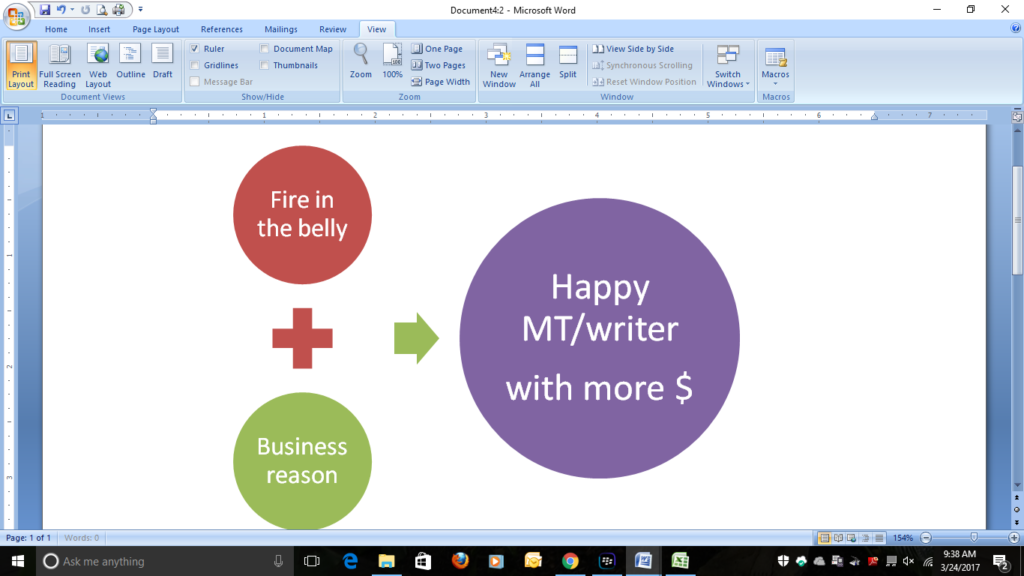
    This little equation took me a long time to get mainly because I thought writing should be driven by the sole desire to express something, and business (money) should be a byproduct.

    How noble I felt early on in my writing career…and hungry because I didn’t have any money…and depressed because no one wanted to read what I wrote.

    But I’m a happy writer when my massage blog produces more customers viewing our website, more customers calling our phone and more referral sources contacting us.

    Here’s what a blog could do for you and your business:

    The Benefits of a Massage Blog

    1. Add more credibility to your website.
    2. Build a stronger relationship with you and potential customers.
    3. Help convert more website visitors into customers.
    4. Improve search rankings for website/blog.
    5. Expand potential referral bases (other health professionals and businesses who see/read your blog).
    6. Re-engerize you about your massage practice.

    Plain and simple, when you write about massage, you learn more about massage. And when you do, you get excited about massage all over again.

    More Benefits

    1. Allow you to work on marketable writing skills.
    2. Set the stage for blog to article or blog to book.

    Think of all the material that you could be covering in your massage blog. I’m sure you can find an article or two or three or four to sell in there. I do this frequently.

    When you turn a blog post into an article you get to know a topic inside out, which is good for you and your client, and you have more money in your pocket after you sell the article.

    1. Be a primer for another blog you want to do.
    2. Keep you focused on your business path.

    If you work for yourself doing massage, you understand that it’s easy to get complacent on the business end of things.

    Have you ever had this happen? A regular client goes away for the summer…another one moves…a third one losses her job…and so on…  Next thing you know you’re down 5 clients per week because you were sleeping at the wheel. Now it’s going to take you a few months to recoup the losses.

    When you’re on schedule with your massage blog, you’re more than likely to be on schedule with your business needs which brings me to benefit # 11.

    Benefit #11–My Favorite

    1. Help you never have to work for someone else again.

    When I ask myself if I could work for someone else, my answer isn’t no.

    It’s HELL NO!

    I’ve tried. And it 100% not for me. Basically it comes down to this, I’m a God-awful, horrible employee because more than anything, I want to work for myself.

    A blog is another tool that helps keep me independent.

    Now that we got through the “why” to blog, what about the “what” to blog about?

    What to Blog About

    Take a deep breath because I’m going to ask you do some thinking and planning. This is important because you’re sure to fail if you have a couple of ideas that seem really cool but you don’t actually have a plan.

    First, pick one or two overarching topics to cover in your massage blog and that’s it.

    Why?

    Because one goal of your blog is to attract, inform and hold the attention of the viewers so that they call you for a massage.

    To me, generic information—the latest study said that massage might be better than chiropractic for pain relief but only on Tuesdays after the full moon…–is not giving my client anything that she can say wow, Mark is really giving me some valuable information or Mark really knows what he’s doing.

    In fact, I may be in danger of boring her to death.

    Go Deep

    Instead drill down on topics that are core to your massage practice. If you do relaxation massage focus in on relaxation massage and relaxation related topics. That will help attract the customers who want relaxation massage

    In addition, going deep into a topic will give you enough information to turn blog posts into articles that you can then sell.

    Let’s use a blog focused on relaxation massage as an example.

    Here are some relaxation massage and related topics:

    1. Where the heck did relaxation massage start?
    2. What makes relaxation massage relaxing?
    3. Is Swedish massage relaxation massage?
    4. Can Shiatsu and acupressure (static pressure) be relaxing?
    5. Why not drink a beer instead of getting a relaxation massage?
    6. Don’t be nervous; here’s what to expect when you get a relaxation massage.
    7. My first relaxation massage experience. (From your—the MT’s— history.)

    Include Topic-Related Material

    1. Is rejuvenation the same thing as relaxation?
    2. Meditation, yoga and massage have this in common.
    3. Which way of breathing helps you relax the best, yoga or Pilates?
    4. Instant mindfulness: an interview with a local Qigong teacher.
    5. How a novice can use imagery to relax.
    6. The easiest meditation method according to…

    The list goes on…

    What if Your Blog is Not About Massage?

    Same strategy applies.

    1. Know your audience.

    If you want to start a fitness blog for personal training side hustle, ask yourself: What do I bring to the table?

    Maybe you’re really good with stretches. So, a chunk of your blog content could be on stretching.

    Like: What are the safest stretches for the piriformis?

    2. Go deep instead of broad.

    Continuing with the example of stretching in a fitness blog, going deep could be writing a blog post like: Is passive piriformis stretching better than active stretching?

    The more you write, the more ideas you’ll have.

    And about a year in, you’ll never feel like your running out of ideas.

    Turn a Blog Post into an Article

    Now you can take one of these posts and expand it into an article or combine multiple posts to create an article.

    This is called re-purposing your work. It’s a great way to maximize the payoff for your writing effort.

    This is my most recent blog to article:
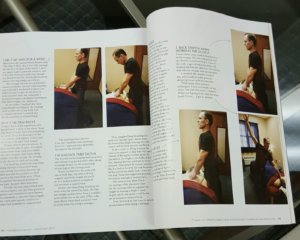
    Back to the relaxation massage example, here’s an idea for a massage magazine: Three ways for a stressed out client to do relaxation breathing while on the table with a sidebar on how to practice breathing and mindful meditation while driving.

    You can also re-purpose material on social media.

    Re-purposing Content on Social Media

    For our massage blog, I focus on runners because we bring in a lot of runners from the local running store.
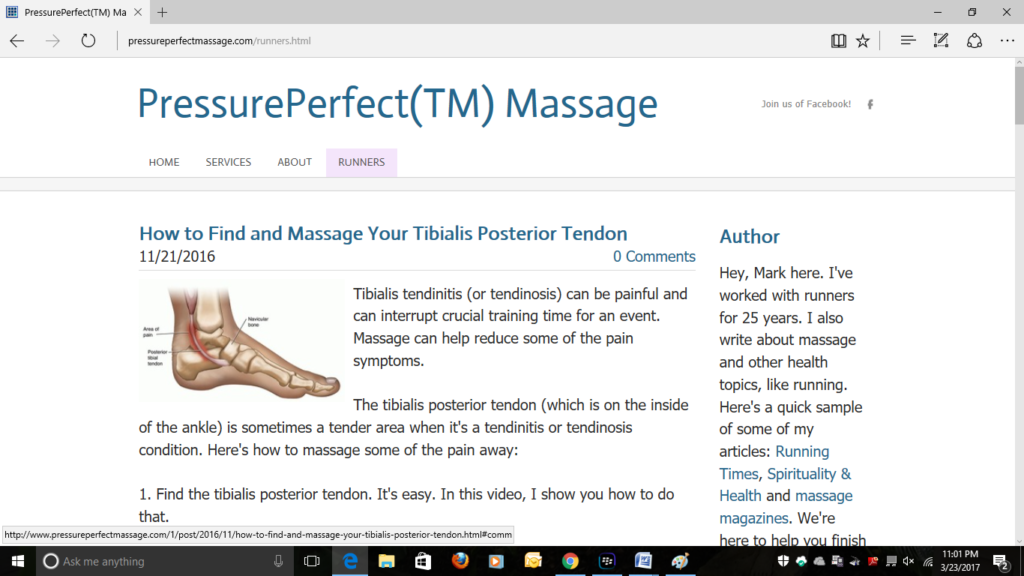
    I re-purpose some of the blog videos by posting them on our Facebook page or my YouTube channel. Sometimes I’ll send a link to a video in an email blast to our customers.

    You can check out my massage blog here.

    When Should You Post?

    Okay, that’s “why” and “what”, now let’s do “when”. When should I do my first post?

    Now.

    What?!

    I know, that’s a lot of pressure, but this tip is going to make it easier: For your first couple of posts, don’t pick hard things to write about. Draw mainly from your experience, like “My First Relaxation Massage” or “How to Do a Relaxing Self-Massage”.

    And keep it short 500 to 750—ish words.

    As you’re writing, keep telling yourself that you’ll be able to get a post out faster in 3 to 6 months. Which leads us to how often should you post?

    Personally, if it were just for my business, I’d start with posting once a month as a goal.

    But if the massage blog was related to establishing a writing side gig, I’d shoot for every other week.

    If you’re having trouble envisioning all this, try making a editorial calendar. That means pick a topic and due date and mark it on a calendar. A good editorial calendar is planned out months in advance. Talk about holding you accountable… Here’s what one looks like:
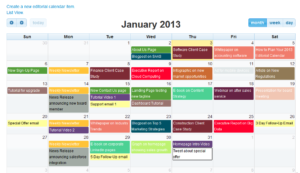
    Here’s what mine looks like now:

    Remember the shiny object syndrome…yeah…that’s sort of what happens to my writing schedule…

    If an editorial calendar reduces your stress, do it. If it adds to it, let it go for now.

    Enough “what”, let’s do the “how”.

    How do I Create a Blog?

    I’m going to show you two ways to do the “how”. One way is to do a Weebly blog and the other way is to do a WordPress blog.

    From here on out, whenever I say Weebly blog or WordPress blog, think website and blog rolled together. This will make sense when you watch the videos.

    Here’s how to pick when deciding between Weebly or WordPress.

    If you want super easy and you’re only planning on doing a blog for your business, go with Weebly.

    If you’re more serious about blogging and writing, go with WordPress.

    And if you still can’t decide, jump ahead to the videos at the end of this article and have a peek.

    Next, if you have a website up and running already, check to see if there’s a blog option in your website builder. If so, you’re good to go. Just look for blog tutorials using your website builder on YouTube.

    If you don’t have a website or your website doesn’t have a blog option or you just want to start new, I’m going to show you how to set up a Weebly blog and a WordPress blog.

    It takes two steps.

    Step #1: Pick a Website Host and Domain Name

    A host is a company that provide web space for you on a server.

    There are a ton of hosts out there. Here’s a list of some popular Web-Hosting-Services.docx (5 downloads) .

    I use Bluehost for a few reasons.

    1. It’s one-stop-shopping. You get your domain name when you sign up with them.
    2. It’s really easy to get started.
    3.  And they provide really good support.

    About needing support…I’m like Lucy in the chocolate factory when it comes to technology. Once I erased my entire WordPress blog. Oops.

    When I called them (about 1 AM on a Sunday), they restored my WordPress blog within a few minutes.

    Since then, I seriously abuse their phone service. I call them about everything, no matter how small the detail.

    They don’t seem to mind–either that or they’re playing it safe because the conversation is being recorded.

    This is my BlueHost link. If you do buy their hosting service through my link, I will get a commission, but you don’t pay more for using the link and BlueHost has a money back guarantee.

    If you choose to go through my link and follow my step-by-step, first I want to say thank you! I really appreciate you supporting my work.

    I also want to let you know that I got your back.

    In other words, I won’t leave you high and dry if you sign up through my BlueHost link.

    Why?

    Because when I first started blogging I was lost, and then I spent a lot of money trying to get un-lost.

    I want you to skip the lost part.

    So, whenever I have a new article or tutorial about blogging, I’ll make sure that you get it.

    And if you get stuck with blogging using BlueHost as your hosting service, just email me or ask your question in the comment section below.

    I promise to make your blogging experience as smooth and painless as possible.

    Think of it as DIY with some extra help from me:-)

    Also, if you haven’t checked out my DIY Website Guide, you may want to if you’re blog is going to be part of your website. BUT for now, if you want get cranking on your blog just continue on. We can add in the website later no problem.

    Okay, if you want to sign up through my Bluehost link and hate dealing with installation of any kind like my friend Bless…

    …just email me, and I’ll set up your blog so that you can make your first post. If you want to do it yourself (it’s not hard to do), read on.

    Quick Set-Up

    Let’s blow through this set-up. If you go to Bluehost, this is the first screen you’ll see:

    Click on the “Get Started” and this will be your next screen:
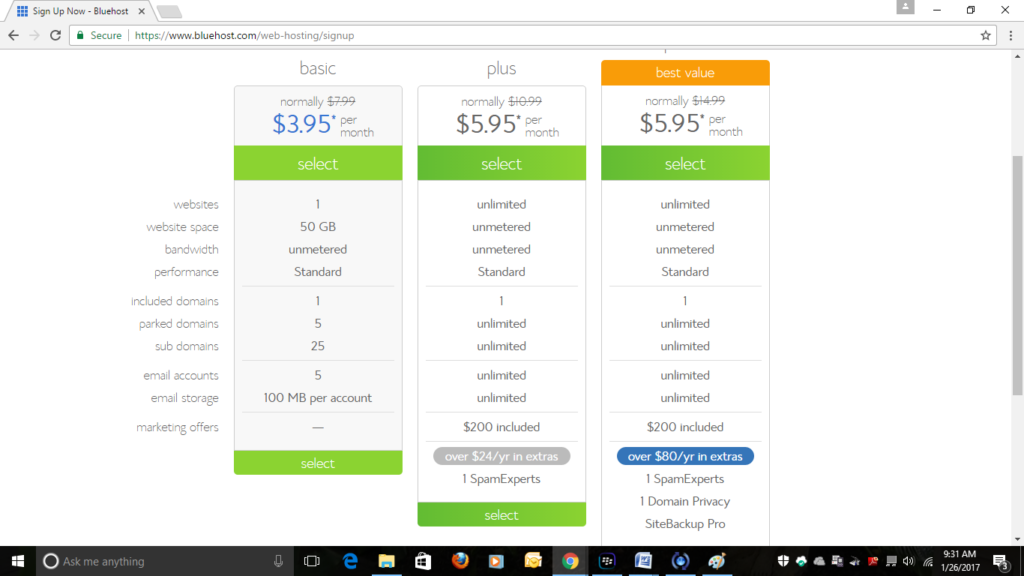
    For now, just select the Basic (the cheapest plan) for $3.95/month. You’re not locked in to this package. We will drill down and figure out which package is best for you after the next step.  Once you select a package, you’ll be taken to this page:
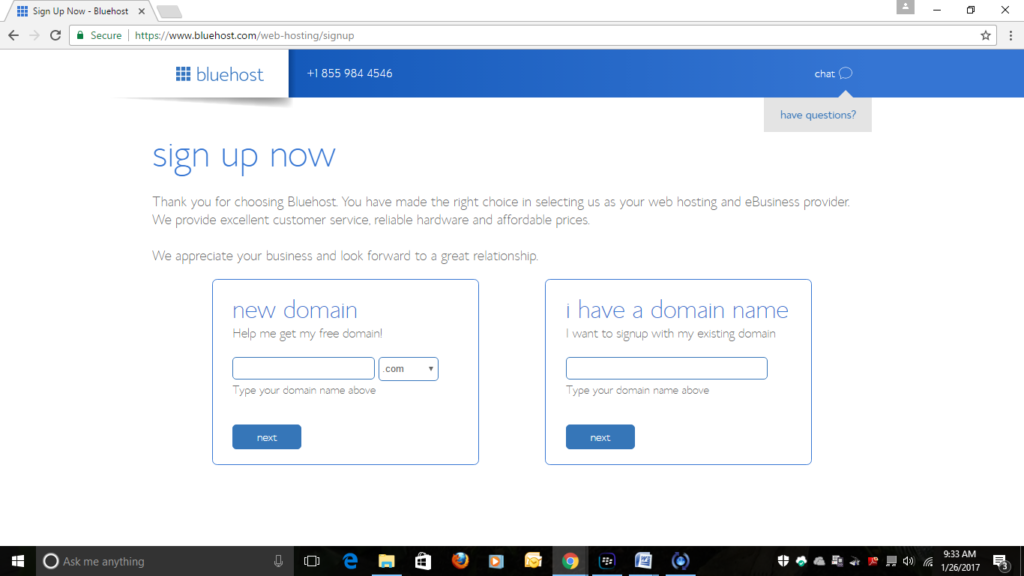
    If you have a domain name enter it into the box to the right. If you don’t, decide on one and use the box on the left.

    Suggestion: if your domain name is taken, try adding words, like “massage” or “massage therapy”. For us, “pressureperfect” was taken, but “pressureperfectmassage” was not.

    If you can’t decide on a domain name just hang out on the page (about 10 seconds or so) and a pop-up will appear which will allow you to continue on without choosing a domain name.

    After you select your domain name, you’ll be taken to the Create Your Account page.

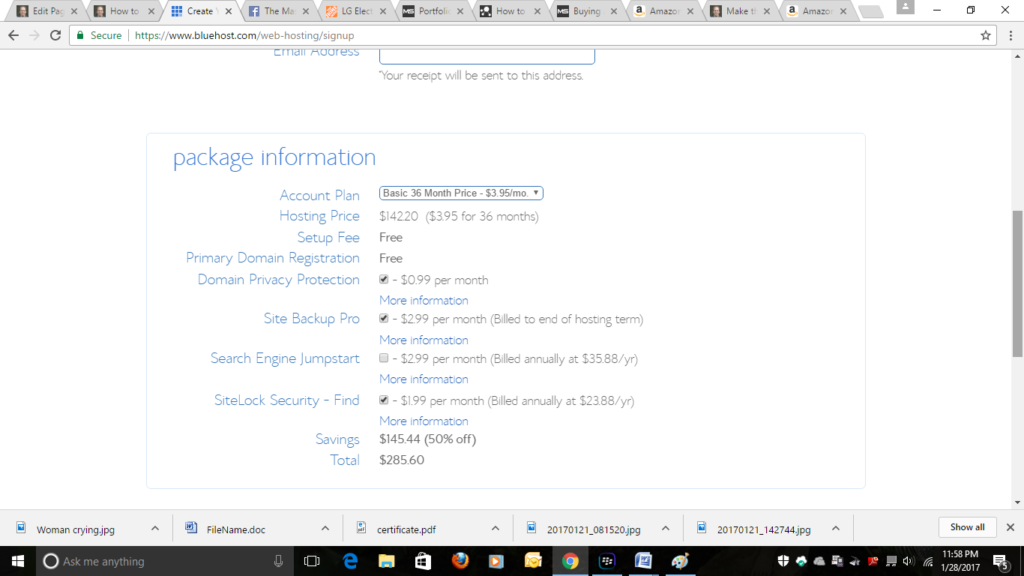
    Once you fill in the account information, you’ll scroll down to the payment section. It looks like this:
    Paying the Least $ as Possible

    Okay, so you want to pay attention here. Look at where it says Account Plan. You’ll see that BlueHost has you connected to the cheapest plan at $2.95 per month; however, it’s for 36 months.

    With Bluehost you pay for everything upfront. So, over the long run you’ll save money with the 36 months plan, but it’s going to be a bigger initial expenditure than the 12 month plan.

    That said, for getting your website up and running for the least amount of money possible, I’d choose the 12 month plan.

    Okay, once you choose the length of your plan look below Account Plan.

    See all those boxes checked? Un-check them and save yourself more money.

    If you’re following my suggestion of 12 month plan with boxes unchecked, your total should be $71.40 and here’s what your screen should look like:

    Once you enter your credit card information, you’ll be asked to create a username and password.

    Then you’ll be offered more things to buy. Pass on that.

    Hit the confirm button.

    Done!

    You’ll soon have a blog (with a domain name that you own) that will cost you less than $72 for the first year.


    BlueHost offers two options for blogs: Weebly and WordPress.

    BlueHost automatically installs WordPress to the first domain name you have with them.

    Which one should you use?

    If you are going to be a serious blogger, I would recommend using WordPress to build your blog.

    If you are going to be an occasional blogger and need super easy, use Weebly.


    Build a Blog

    So, which one are you going with Weebly or WordPress?

    Weebly Blog

    Okay, if you’re going with Weebly your next step is to uninstall WordPress that was automatically installed to your Domain name.

    Omg, Mark, you sucker punched me! I can’t uninstall anything!

    Hold on. This is how we are going to make it easy.

    Call BLUE HOST support: 888-401-4678

    Say to the agent: “I want to use the Weebly sitebuilder for my website, so would you please uninstall WordPress for me?”

    The agent will uninstall WordPress. (It should only take minutes.)

    When that’s done ask the agent: “Can you please show me how to navigate to my Weebly site builder?”

    That’s not hard.

    Choose the free version of Weebly to use. Once you’re on your Weebly start building!

    You can use two approaches to starting your Weebly massage blog.

    One approach is to build your website first, then add the blog. The other approach is to just start the blog and let that serve as your website for now. You can always build the website later.

    Pretty freakin’ cool, huh?

    Oh, and nothing is set in stone. If you do a Weebly blog now and decide that blogging is really working for you, you can always switch over to WordPress (the better blogging platform) later. No problem. I’ll show you how to do that in upcoming videos.

    Here are the Weebly Blog tutorials;

    How to do Your First Weebly Blog Post (Blog is the Website)

    [embedyt] https://www.youtube.com/watch?v=yYnvVGDdAi8[/embedyt]

    How to do Your First Weebly Blog P0st (Blog as Part of the Website)

    [embedyt] https://www.youtube.com/watch?v=PmP2awGKyC8[/embedyt]

    WordPress Blog

    Now for WordPress. Just a heads-up, it won’t be like painting with Bob Ross.

    Actually, you’re going to get in there and look at the guts of the blog and say “Oh, crap”. BUT I’m going to make it really, really easy for you because I’ve done all the “Oh, crap”-ing already and have figured things out.

    Another heads-up, once you start getting the WordPress system down, you might just get addicted. It’s like decorating a house.

    But for now, let’s keep it simple and use the generic WordPress theme (appearance) that was installed automatically to your domain name when signed up with BlueHost.

    You can change themes (appearances) later. Some themes cost a small amount of money, but a lot are free.

    *In this video you will see that I’m first installing WordPress: DON’T DO THAT. Remember WordPress (and it’s generic theme) we’re automatically installed when you signed up.

    [embedyt] https://www.youtube.com/watch?v=X3sD8tcuIYs[/embedyt]

    Not bad, huh?

    But there’s one more thing you’ll need to know, when you’re ready to publish your first post, your gonna be peeing yourself.

    Who’s going to read it? Are they going to hate it? Do I hate it? Did I do a good job proofreading?

    Here’s the thing, you’re always going to be second guessing yourself.

    Publish it.

    You can always go back and make edits at anytime.

    Here’s what happens to you when you publish it:

    Oh, yeah! You’re gonna feel good!

    When you get a chance, send me a link. I’d love to see what you’ve done!

    The Short Version

    Here’s a recap of the whole shebang without the “talking you through all the parts”.

    1. Pick a Web Host.

    I recommend Bluehost.

    1. Pick a Domain Name.

    With Bluehost, you do this during the same step when you sign up with them.

    Suggestion: if possible your domain name should be the name or close to the name of your business.

    If your domain name is taken, try adding “therapy”. For example, MonicaMassage.com is taken. Try MonicaMassageTherapy.com.

    Or stick with MonicaMassage but add a different suffix: MonicaMassage.net or MonicaMassage.biz.

    1. Set up your massage blog on Weebly or WordPress and write your first post.

    Here are the tutorials to get help you get your first blog post out there. Remember that it doesn’t have to be perfect. In fact, it won’t be–but it will work!

    Weebly #1: How to do Your First Weebly Blog Post (Blog is the Website)

    Weebly #2: How to do Your First Weebly Blog Post (Blog as Part of the Website)

    WordPress: How to do Your First WordPress Post

    One more time!

    P.S. If you’re struggling with something, jump on my email list. Once I know what you need help with, I can send the right videos, tutorials and articles. The email group is free and you can unsubscribe anytime.

    [contact-form][contact-field label=’Name’ type=’name’ required=’1’/][contact-field label=’Email’ type=’email’ required=’1’/][/contact-form]

    .