Category: Uncategorized

  • How to Save Money Building a Weebly Website

    I want to build the cheapest website possible.

    Hmm…are you sure about that?

    Or do you actually want to build the cheapest website possible using a reliable and easy-to-use website builder.

    If so, take a look at Weebly.

    Weebly is all three: easy to use, inexpensive and reliable.

    So, end of story?

    Not quite.

    Because when we look at Weebly pricing, you have more options than just buying straight from Weebly.

    You can buy through a web host.

    A web host provides storage space and the technologies for a website or web pages to be viewed on the Internet.

    And some web hosts, like Bluehost, have the Weebly website builder.

    I’m a fan of Bluehost because they have great customer service and they offer an inexpensive way to use Weebly.

    How inexpensive?

    You can do a three year term for $35.40/year.

    Dang dawg, that’s cheap, right?      

    But to make an informed decision about purchasing Weebly or Bluehost we need to seriously do an apples-to-apples comparison.

    Don’t worry, I’m not going to make this a big, hairy deal.

    I’m going to distill it to the essentials so you can get crackin’.

    One last thing before we get started, some of the links in this article are affiliate links.

    So, if you buy through a link I get one-time commission.

    But you don’t get charged extra if you do.

    And if you do, thanks for supporting my work!

    By the way, if you need help with Weebly, Bluehost or anything I recommend, email me at mark@makethemostofmassage.com 🙂

    Okay, onto Weebly and Bluehost for your inexpensive website.

    Weebly versus “Weebly on Bluehost”

    With Weebly you pay annually.

    With Bluehost you first buy a package which could be a one, two or three year plan. Then after the package terms are over you pay annually.

    If you want (1) the Weebly website builder, (2) email (with your domain name), and (3) free domain name for 1st year, here’s what the comparison looks like:

    1st Year
    Price
    Weebly (1 yr) Bluehost (1 yr) Bluehost (2 yr) Bluehost (3yr)
    Website
    Builder
    $60 $59.40 $47.40 $35.40
    Domain
    Email
    $60 0 0 0
    Domain name 0 0 0 0
      $120 $59.40 $47.40 $35.40

    Where’s that Bluehost link to click, right?

    But there is more to consider, Bluehost, like Weebly, wants its money upfront.

    So, if you signed up for the Bluehost 2 year deal, you’d pay $94.80 upfront for the 2 years.

    The Bluehost 3 year deal would cost you $106.20 upfront.

    Even so, 3 years of Bluehost ($106.20) is still cheaper than 1 year of Weebly ($120).

    Continuing on with Bluehost, after your 1, 2 or 3 year package deal is over, you will pay the regular price of $7.99/month ($95.88/year).

    Let’s make this a little cleaner.

      Year 1 Year 2 Year 3 Year 4
    Weebly $120 $120 $120 $120
    Bluehost 1 yr $59.40 $95.88 $95.88 $95.88
    Bluehost 2 yr $47.40 $47.40 $95.88 $95.88
    Bluehost 3 yr $35.40 $35.40 $35.40 $95.88

    (With both Weebly and Bluehost, you can get a domain name with them for free the first year. After that you pay for domain name renewal, which is usually between $15 and $20 a year.)

    It seems like a pretty easy decision right now, but Bluehost may not be for everyone because there are more steps to using the Weebly website builder.

    For one, instead of going straight to the Weebly website builder when you sign in on Bluehost, you go to your control panel where you can then select the Weebly website builder to use.

    If at any time you get confused and need some help, just call Bluehost customer service. They run 24/7.

    Another thing to consider is that Weebly does provide email support for the website builder under the basic plan that I’m using in this comparison, but Bluehost doesn’t.

    That said, the Weebly website builder is super-easy to you use.

    You can find the answer to probably any question you have about Weebly by doing a Google search or you can ask me.

    If you’re cringing at the thought of adding steps by using Bluehost, but going with Weebly at $120 a year is too much, you can always not purchase the Weebly email option ($60 a year) and only pay $60 total for the year.

    If you’re keen on having a professional presentation from the get-go (domain email address) for the least amount of money, then there are 4 things you need to do with Bluehost:

    1. Go with the Basic Plan to start.

    You can always upgrade later. 

    2. The cheapest Basic Plan will be the one that has the longest terms.

    In other words, the 3-year-plan ($2.95/month) will be month-to-month cheaper than the 1-year-plan ($4.95/month).
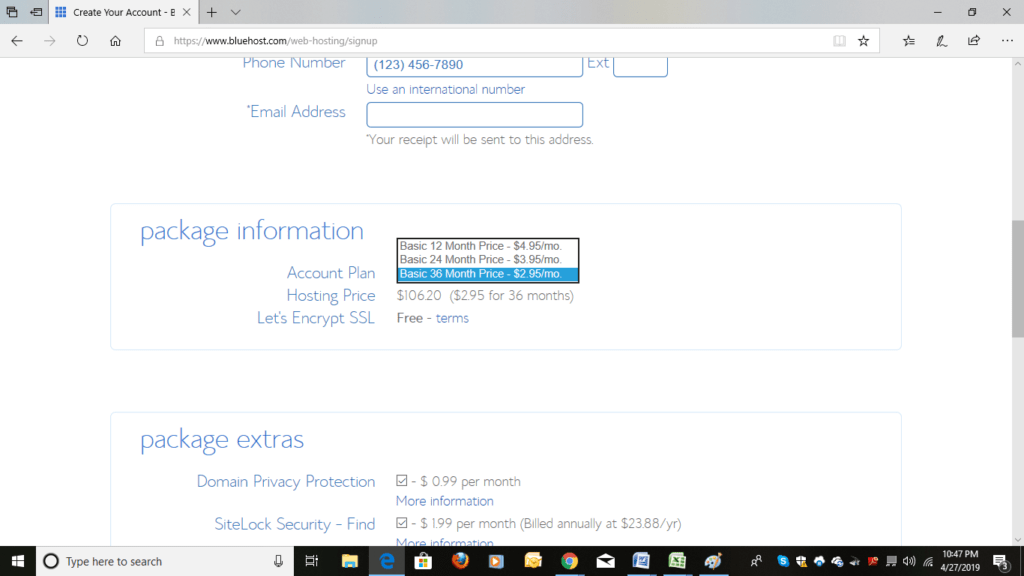
    My advice would be that if you’re all in with the blog idea, save money and go for 3 years.

    If it’s an experiment, sign up for 1 year. 

    3. All hosting companies will try to up-sell you on other stuff you don’t need, like domain privacy.

    See those boxes that they automatically check for you in the package extras section? Un-check them and save yourself some more money.
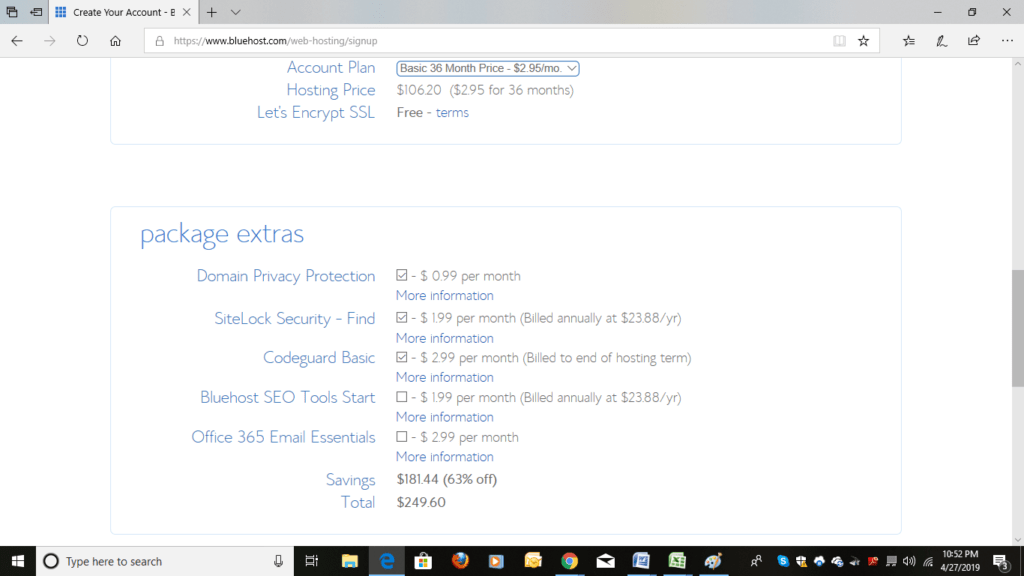
    So, your total should just be the price of your account plan.

    1 year Basic Plan = $59.40 ($59.40/year for 1 year).

    2 years Basic Plan = $94.80 ($47.40/year for 2 years).

    3 years Basic Plan = $106.20 ($35.40/year for 3 years).

    When buying a package you can’t pay month-to-month. You pay everything upfront to get the deal.

    4. Get Bluehost to Un-install WordPress

    When you purchase Bluehost they automatically install WordPress (another way to build a website.)

    You need to un-install that if you want to use Weebly on Bluehost.

    No, I didn’t screw you! Lol.

    Just call Bluehost (888-401-4678) and have them un-install it.

    No biggie.

    It will take them less than a minute.

    Lean on that customer support.

    In this video, I build a Weebly website on Bluehost.

    https://www.youtube.com/watch?v=vkfVeyxS-b8

    My Recommendations in a Nutshell

    Weebly Builder

    NOT techie: Go right to Weebly.

    To save the most $ using a Weebly website builder and have a domain email: Go with Bluehost.

    Multiple Websites

    If you plan on having more than one website use a web host service, like Bluehost.

    With Bluehost you’ll have to upgrade to the next level, but then you can build a whole lot of Weebly and WordPress websites for way cheap.

    Best Designs for a Website

    If appearance ranks #1 in your criteria for choosing a website builder, go with Wix.

    You can read more about that here.

    Content for a Website

    Don’t no what to write on your website?

    Check out: How to Build a Website Guide.

    And if you have a question about building a website.

    Let me know:-)

  • Massage with Your Back to the Table

    Why would you want to do massage with your back to the massage table?

    Well…there are two reasons why I do massage with my back to the table.

    One, I can get a quick rest.

    And, two, I can get more vertical so that I can get out of a static posture.

    By static posture in the massage room I mean a prolonged work position, like hunchy back.

    Before you think I’m nuts, I need to throw some qualifiers in here.

    Strategic Back Bends

    First, I don’t have my back to the table for long periods of time.

    In fact, the times I do are strategically worked into the massage.

    And, two, I’m only using one hand (though I have experimented with two).

    I know, it’s getting hard to picture, right?

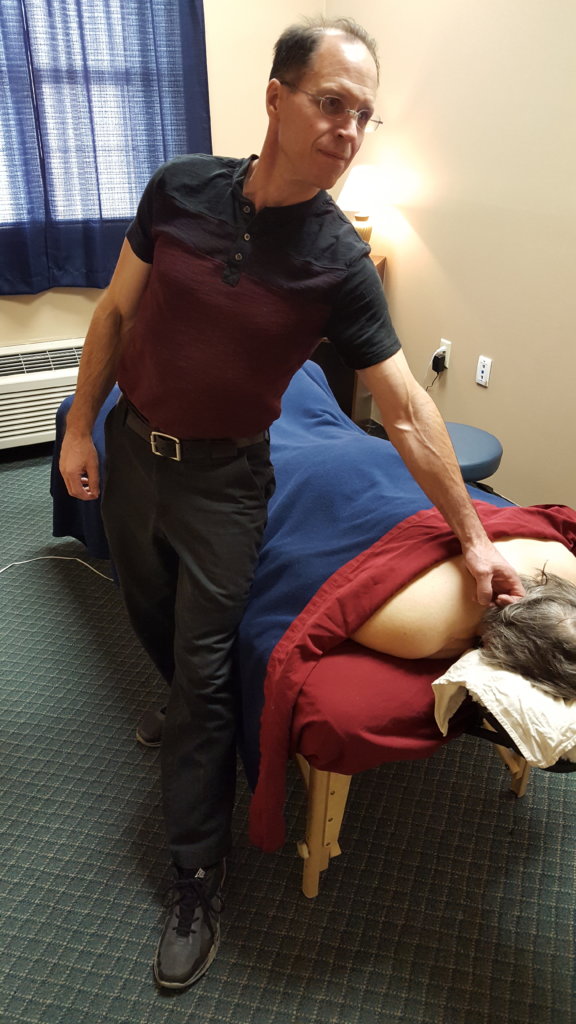
    So here’s what it looks like:

    I’m applying static pressure with one hand.

    And by using only one hand I can stand up straighter than if I had two hands on the client.

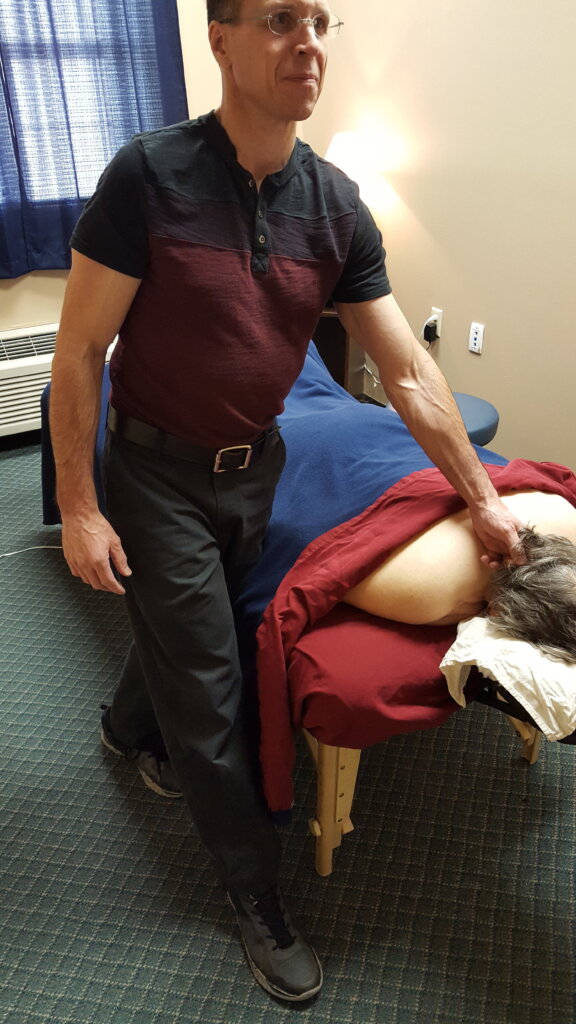
    But, Mark, can’t you just stand up straight with having one hand on your client and without having your back to the table?

    You can.

    It looks like this.

    But when you have the back of your legs against the table supporting your weight you can actually lean back a tad and get more extension in your back (like you’re doing a standing cobra).

    Man, does that standing cobra feel good.

    Besides occiput trigger point work, my other favorite times to do standing cobra are with sacrum compression…

    and hamstring compression near the ischium. (It’s a super-comfortable lean into area.)

    Get Your Standing Cobra On

    So what about you?

    Do you actually take time to rest during the massage?

    You should.

    Try the standing cobra rest/recharge.

    Standing Cobra Formula

    Here are the steps:

    1. Pick your areas to try it in.

    My areas are sacrum, hamstrings, and occiput.

    By the way, your table will have to be low to do this.

    Go here for more information about experimenting with a low table.

    2. Turn your back to the table, switch to one hand and lean into the one hand as you straighten your back.

    3. Then allow yourself to lean back into the table so that you create some extension in your back (standing cobra).

    You’ll know you’re doing it right when there’s absolutely no strain in your back because your body weight is supported by the back of your legs against the table and your hand on the client.

    Take strategic rests (resets), like standing cobra, and you’re body will be happier.

    Add if you layer in other strategies you’re body is going to be so happy that you’ll be able to raise your weekly massage max.

    By the way, the How to Deliver Deep Pressure without Hurting Yourself course is here. It’s a 3 CEU online, home study course. It’s packed with videos and guidance. Let’s get you out of pain and keep you out of pain:-)

  • Massage Marketing Tips: Free Tools (Square, SendinBlue)

    Square and SendinBlue have free services that make my heart ka-ching.

    Square is a credit card payment service.

    SendinBlue is an email marketing service.

    I’m not going to lie, I wish I didn’t have to use a credit card payment service or an email marketing service.

    For one, I want all the money for each massage I do.

    But a lot of clients want to pay by credit card.

    So, you have to pay-to-play.

    Regarding an email marketing service, here’s what I was willing to spend on email campaigns in the past.

    $0.

    Oh, “free” was out there.

    And I found it, but “free” was okay at best.

    As my business grew I outgrew “free”, but the not-free version was too expensive

    Couple that with a monthly fee my credit card payment service was charging me on top of transaction fees and it felt like some major sticking it to the little guy/gal.

    But now it’s different.

    I have a free email service with all the features I need and a credit card payment service that gives me the capability to sell gift certificates and schedule clients online for free.

    That’s huge.

    Seriously.

    Okay, before I get too excited and have a heart attack, I need to tell you that the services I recommend below have affiliate links. That means if you click on a link and sign-up for a service, I get a commission.

    If you sign up through a link, thank you for supporting my work! And if you ever have a question/issue with a service I recommend, come to me, let me know and I’ll make sure that you have an answer/solution.

    Sound good?

    Okay, back to free.

    Let’s start with Square.

    Square

    Square charges a percentage fee for each credit card transaction (like all credit card payment systems).

    So, they want you to do A LOT of transactions!

    And out of the goodness of their hearts (haha), they provide tools to help you sell.

    Enter online gift certificates.

    Online Gift Certificates

    If you have a free Square account go to the home page and click on gift cards.

    There you can choose your template and fill in the the dollar amounts.

    Once you’re done that you simply click on Configure and that’s where you’ll find the URL to stick on your (hyperlink) website. (If you need help with that, let me know.)

    That URL takes the customer to a Square page where she can purchase an  online gift certificate and print it out or send it via email to someone else.

    Here’s what it looks like on our PressurePerfect website.

    In the past I used a service called Gift Card Café to sell printable gift certificates on our website.

    Their cost is an additional 4.95% per order for the Lite plan on top of the normal credit processing transaction fees of the credit card payment system.

    Free versus an additional 4.95% per order…wait let me think about this—NOT.

    Online Scheduler

    Like I said, Square wants us to have everything we need to sell our services so that they can profit, too.

    That’s why they also provide an online scheduler.

    For a one-person massage operation (individual), the scheduler is free.

    It syncs with Google calendar.

    Clients can book on your website and you can set it up to text appointment reminders to clients.

    Did I mention it was free?

    I’m loving what Square is doing.

    The more marketing tools they provide to us (for free), the more both of us make money.

    Total win/win.

    Okay, onto the dreaded email campaigns that no one wants to do.

    SendinBlue

    I had a love/hate relationship with my previous email service, Mailchimp.

    I loved that Mailchimp had a free option which allowed me to do email campaigns when I was at my poorest as a massage therapist.

    I didn’t like that the free version wouldn’t allow me to do certain things, like automated emails, without upgrading to a paid version which was cost prohibitive at the time.

    But the biggest problem I had with Mailchimp was that there was no support for the free version.

    Guess what? I’m massage therapist with a massage business not an accounting firm with a marketing team. I need help.

    The final straw for me with Mailchimp was when it wouldn’t allow me to send a time-sensitive email campaign and there was no way I could resolve the issue right then.

    Within 30 minute I discovered SendinBlue. An hour later, I had transferred my contacts to SendinBlue and sent the email.

    Can I just say, I love them.

    High-Five Usability

    The dashboard is super easy to understand and use.

    Directions are clear.

    And they provide support—even if you’re using the free version.

    Basically, SendinBlue provided all the solutions to the problems I had with Mailchimp.

    And it’s no accident that they’ve reached frustrated Mailchimp users like me.

    By the way, if you know that you should be doing some email marketing, but don’t know what to do, go here.

    More Low Cost Marketing

    Hey, we’re not done saving money. I have more ways that I make online marketing affordable.

    I build my own websites without hiring a designer or a SEO specialist.

    The two resources below will help you out with that.

    Build a Massage Website Guide.

    Choose a Website Builder Article (4 minute read)

    And if you want to know when I have more cost-saving tips out, sign up for my email group.

    It’s free:-)


  • The Biggest Mistake in My Massage Career

    What was my biggest mistake in my massage career?

    Wait, just one…I’ve got 4 screaming Pick me! Pick me!

    Okay, just one.

    Here’s my pick: Mission creep.

    Specifically, I didn’t stay focused on building a massage business.

    I kept chasing other business ideas instead.

    Why did I chase other business ideas?

    Because I wanted to be more than Mark massage.

    I wanted to be Mark writer.

    Mark audio history business owner.

    Mark Renaissance person.

    But there’s more to my mission creep than me just not wanting to be boxed in.

    Though I wanted the independence of working for myself, being 100% responsible for bringing in the business scared the pee out of me.

    That’s why a chunk of my massage career was punctuated with side jobs, like new business fitness center consultant and personal trainer.

    Don’t get me wrong, having a job outside of massage is not a bad thing at all.

    But a potential trap of adding another job is that you may be bailing on your massage career/business.

    The Insidious Bail

    The thing about bailing is that it’s sometimes hard to know when you’re actually doing it.

    In my work life bailing wasn’t: I’m out of here!

    It was more like: I can make a few extra bucks doing this.

    The “this” paid some bills. And so I did more of “this”.

    Meanwhile, the more I did “this”, the less time I had to get massage clients.

    You see where this is going.

    It’s a slow bail with an inevitable outcome—your massage door slowly closes.

    Talk about a catch-22, right?

    The additional job is paying bills and provides emotional security. But the additional job starts to pull you away from your massage career. And the next thing you know, you’re thinking about getting out of massage altogether because it’s not making you enough money.

    At this point, it’s easy to jump to this question: So, how long should I try before I give up on the idea of having a successful massage business/career?

    My answer: I have no idea.

    Sure, you can set an arbitrary timeline around the question, but I don’t think that is going to put you anywhere closer to success.

    There’s a better question to ask and it’s this: How hard should I try before I give up?

    I have an answer for that one: Harder than you’ve ever tried.

    Market and do massage until it hurts and then do it some more.

    The Way “Hurt” Has Worked for Me

    When I went all in with massage, I was forced to figure out the “bringing in more clients” thing.

    And I did.

    Here’s what I did.

    Then when I had so many client that my arm went numb and my elbow wanted me out of command central, I was forced to figure out the body thing.

    And I did.

    Here’s how I did that. (Btw, another solution would be to hire people to work for you. We did that, too.)

    The point is that you don’t get to be a successful parent unless you stay the course and work harder than you’ve ever thought you could so that you have the opportunity to figure out the challenges of parenting.

    And you don’t get to have a successful massage business/career unless you work your butt off bringing in and working on clients.

    The Price to Pay

    Does avoiding mission creep, being focused on your massage business/career, mean you have to give up your free time?

    Yes, but only for a very short period of time in the grand scheme of things.

    Once you get your massage business/career to where you want it to be, you then have the freedom to create other revenue sources or use your time elsewhere.

    Ask my massage therapist friend, Bobbi. She goes away 3 months of the year and returns to her massage business as if she had never left.

    Is it Mission Creep or Time to Add an Additional Job?

    So how do you tell the difference between mission creep and a legitimate need to add another job?

    Well, first you need to ask yourself what part of your income do you want massage to represent? 25%, 50%, 75%, or 100%?

    If it’s a 50% or below then obviously you need another job, too.

    And if you’re hovering around the 75% plus range and you’re current massage income isn’t enough to pay the bills, then, yes, get that 2nd job.

    But beware of mission creep because this is what’s going to happen next.

    You’ll be dead tired from working that extra job and you’ll feel like you’re working hard enough to bring in clients, but the truth is you won’t be.

    Accept the pain.

    Do more.

    By doing you’ll create the perfect environment for figuring out how to build a massage business/career that works for you.

    Need more help bringing in clients?

    If you’re starting your business or have a business that is making less than 30K, go here: Jumpstart.

    If you have a business that is paying the bills, but you want to take it to the next level, go here: Accelerator.